
Touchless Order Processing for SAP Distributors: A Practical Guide
Distributors live or die on order speed and accuracy. Here's how touchless order processing turns the flood of email, PDF, and WhatsApp POs into posted SAP Sales Orders — without growing your order desk.
For a distributor, the order desk is the heartbeat of the business. Retailers, sub-distributors, and key accounts send purchase orders all day — by email, as PDF attachments, on WhatsApp, sometimes as a photo of a handwritten sheet. Every one of those has to become a clean Sales Order in SAP before anything ships. When that conversion is manual, the order desk becomes the bottleneck: orders queue, errors creep in, and peak-season volume forces you to hire temps just to keep up.
Touchless order processing fixes that. It is the practice of moving an order from intake to a posted SAP Sales Order with no manual keying — AI reads the PO, validates it against your ERP, and posts it, while your team handles only the exceptions. This guide explains what “touchless” really means for a distribution business and how to get there on SAP Business One or SAP S/4HANA.
What “touchless” actually means
Touchless does not mean “no humans.” It means no manual data entry on the happy path. A clean, valid order flows straight through; only the orders that genuinely need a decision — an unknown item, a price that does not match the contract, a credit issue — stop for a person.
Compare the two flows:
- Manual: PO arrives → someone reads it → looks up customer and item codes → checks price and stock → types a Sales Order → posts it. Minutes per order, every order, with errors along the way.
- Touchless: PO arrives → AI extracts and validates it against SAP → clean orders post automatically, exceptions route to a human. Seconds per order, attention only where it is needed.
For a distributor pushing hundreds or thousands of order lines a day, that difference is the difference between scaling with software and scaling with headcount.
Why distributors feel the pain more than anyone
Distribution has three characteristics that make manual order entry especially costly:
- Format chaos. Orders come from many customers in many formats. There is no single clean template — one retailer sends a tidy PDF, another pastes items into an email, a third sends a WhatsApp photo.
- Thin margins, high volume. Distribution runs on volume and tight margins, so a pricing or quantity error on a large order erases the profit on many others.
- Speed is the product. Customers choose distributors who confirm and ship fast. A PO that waits hours in an inbox is a service failure your competitors are happy to exploit.
This is the same last-mile reality we see across route-to-market operations — the kind addressed in our work on ERP-integrated sales & distribution execution, where field and channel orders have to reach SAP in real time, not at the end of the day.
How touchless order processing works on SAP
The mechanics are the same flow described in our guide to automating sales order creation in SAP Business One, applied to the distributor’s inbound order stream.
1. Capture every PO, whatever the channel
An AI extraction agent watches the order inbox and customer portals and intercepts each incoming PO the moment it arrives — email body, PDF attachment, or scanned document — so nothing waits to be downloaded or forwarded.
2. Read it without templates
Using intelligent document processing, the agent extracts customer, item codes, quantities, and pricing from whatever layout the PO uses. There is no per-customer template to maintain, which is what makes it workable across a messy, multi-customer order stream.
3. Validate against SAP in real time
Extracted data is checked against SAP Business One master data — customer codes, item masters, contract pricing, tax, and stock. Mismatches, unknown SKUs, and price variances are caught before posting, not after the goods are on a truck.
4. Auto-post the clean ones, route the rest
Valid orders post straight to SAP as Sales Orders. Anything ambiguous — a credit-limit breach, a discontinued item, a price that does not match the agreement — is routed to a human with the original PO shown side by side for fast review. That is the human-in-the-loop control of UpBuff’s PO-to-SO automation: full speed on clean orders, full control on the exceptions.
Proof from the field
Distribution at scale is not theoretical for us. Working with Fareast Mercantile Co. (FMCL) in Ghana, UpBuff replaced paper-based sub-distributor billing with a geo-tagged, offline-capable mobile sales platform serving 30,000+ retail outlets, with 70%+ of the sub-distributor network onboarded within 10 weeks of go-live. The lesson that carries directly into touchless order processing: when you remove manual steps between the order and the ERP, visibility and accuracy improve at the same time as speed. You can read the full FMCL sub-distributor management case study for the details.
What to look for in a touchless solution
Not every “automation” is truly touchless. Before you commit, check that the solution:
- Reads unstructured POs (email body, PDF, scans) — not just structured EDI or templated files.
- Validates against live SAP master data before posting, so errors are prevented rather than discovered later.
- Keeps a human in the loop with side-by-side source verification and configurable approval thresholds.
- Posts through official SAP APIs (Service Layer, OData, DI API) without modifying the ERP core, protecting your upgrade path.
- Logs every action for a complete audit trail across orders.
If a tool skips the first two, it is automating the easy part (posting) and leaving you the hard part (reading and validating).
Getting started without disrupting operations
The safe way to adopt touchless order processing is incrementally. Start with one high-volume order channel and run it in manual-approval mode, where AI extracts and validates every order but a person still approves each post. As accuracy proves out, raise the automation threshold so clean orders flow through untouched and only exceptions stop. Because nothing modifies the SAP core, you can go live on a single channel in weeks and expand from there.
Ready to take your order desk touchless?
If POs are stacking up in an inbox and peak season means hiring temps, touchless order processing is the highest-leverage fix available to a distributor. See how UpBuff’s Intelligent PO-to-SO & Invoice Automation turns email, PDF, and scanned purchase orders into posted SAP Sales Orders — with full human control and audit transparency — and pair it with ERP-integrated sales & distribution to bring your whole route-to-market into real time.
Related posts
View all posts »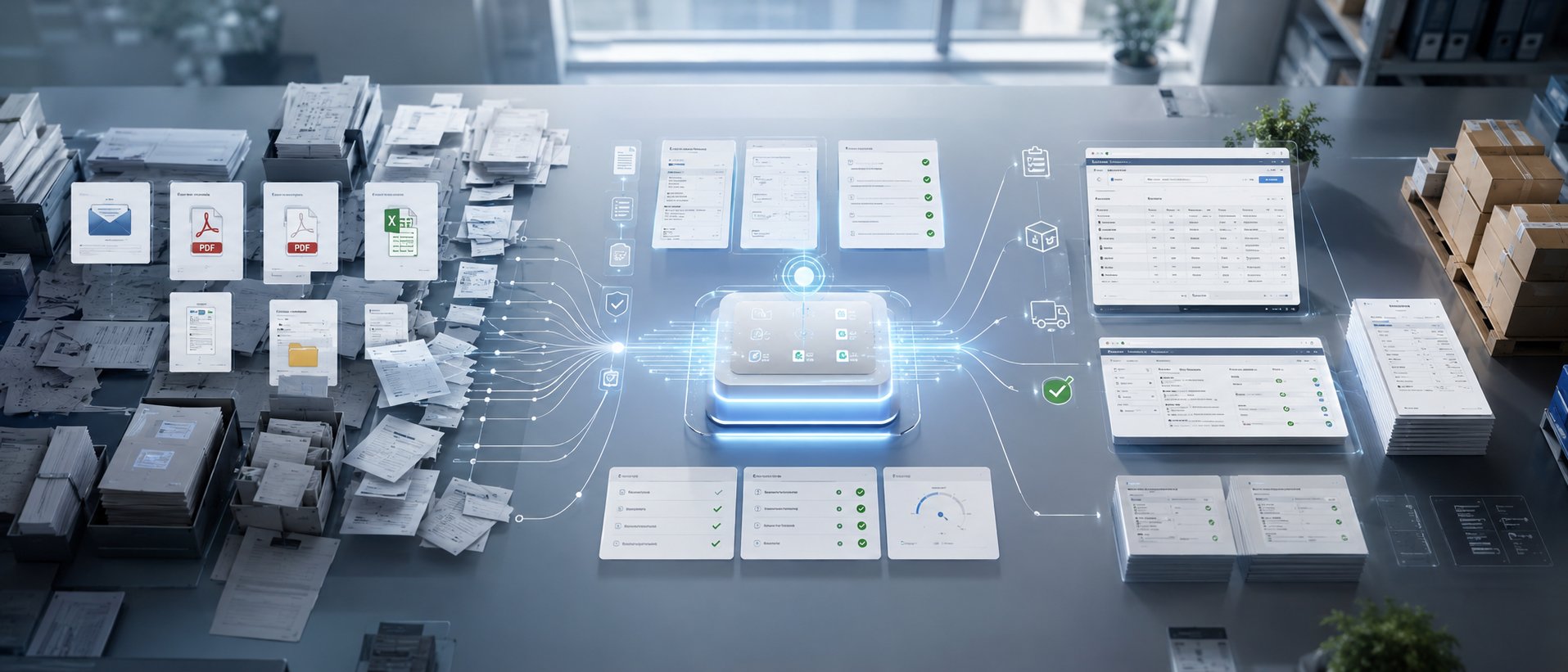 ERP Operations
 How to Automate Sales Order Creation in SAP Business One
Still keying customer POs into SAP B1 by hand? Here are the practical ways to automate sales order creation in SAP Business One — from native tools to AI-driven, touchless PO-to-SO automation.
 ERP Operations
 AI PO-to-SO Automation vs. Manual Order Entry vs. EDI: Which Wins?
A clear, side-by-side comparison of the three ways to turn purchase orders into SAP Sales Orders — manual entry, EDI, and AI PO-to-SO automation — with a simple framework for choosing the right one.
 ERP Operations
 PO-to-SO Automation for SAP S/4HANA: The Enterprise Guide
How large enterprises automate purchase-order-to-sales-order conversion in SAP S/4HANA with AI — Clean Core compliant, human-in-the-loop, and without touching the ERP core.